Defining Valid Mates
To define a valid mate:
- Select a connector in a Library.
- In the Properties Panel scroll down to Valid Mates and click
 A pop-up window will appear. By default, the library containing the connector will be selected, and all the connectors in that library will be displayed in the right column.
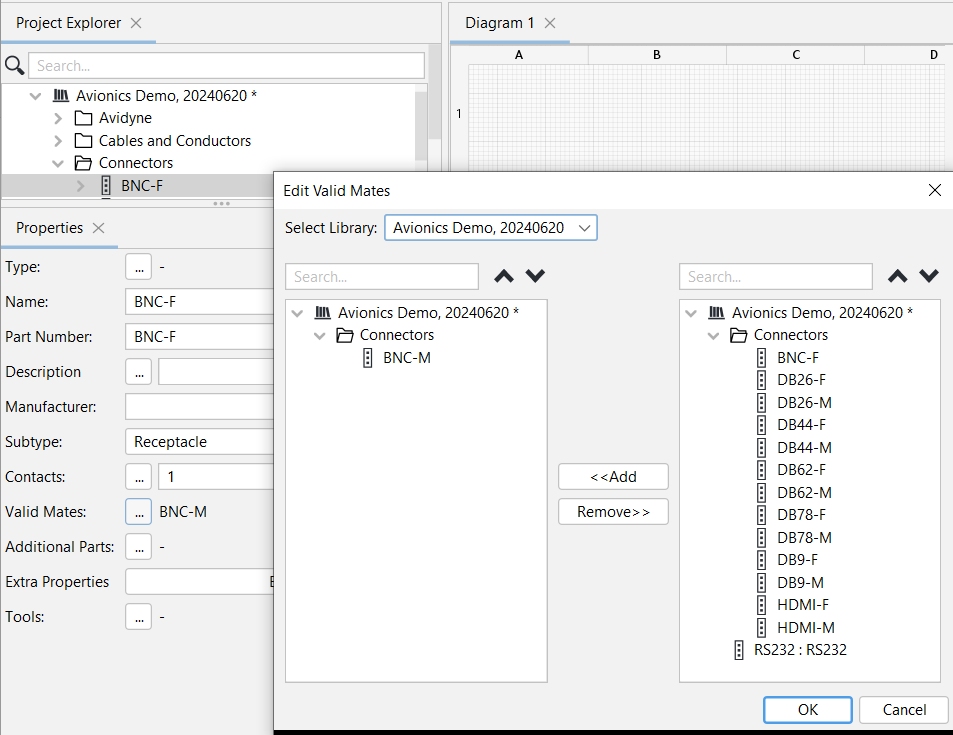
- Select a mate in the right column then click the Add button.
Wiring Planner will check the selected mate according to the Design Rule Checks (DRCs) to ensure that the connectors have the same number of contacts and are the correct subtypes to be mated.
- If the selected mate passes the Design Rules Checks (DRCs), the mate will be shown in the Properties Panel. If the selected mate does not pass the DRC, an error message will be displayed.
- Connector mates are complementary, meaning that if Connector B is defined as a valid mate for Connector A, then Connector A will automatically be defined as a valid mate for Connector B.
Related topics:
Defining Connector Subtypes and their Valid Mates
Mating and Unmating Connectors
Instantiating a Connector in a Project